Answer questions about your jobs
“What needs my attention on Cedar Ridge?” “Which RFIs are overdue?” “When is the scissor lift due back?” It looks at your actual records, not a guess.
AI assistant
The PMT1 assistant lives behind one button on every screen. It reads your actual project records, and it can create and update them for you.
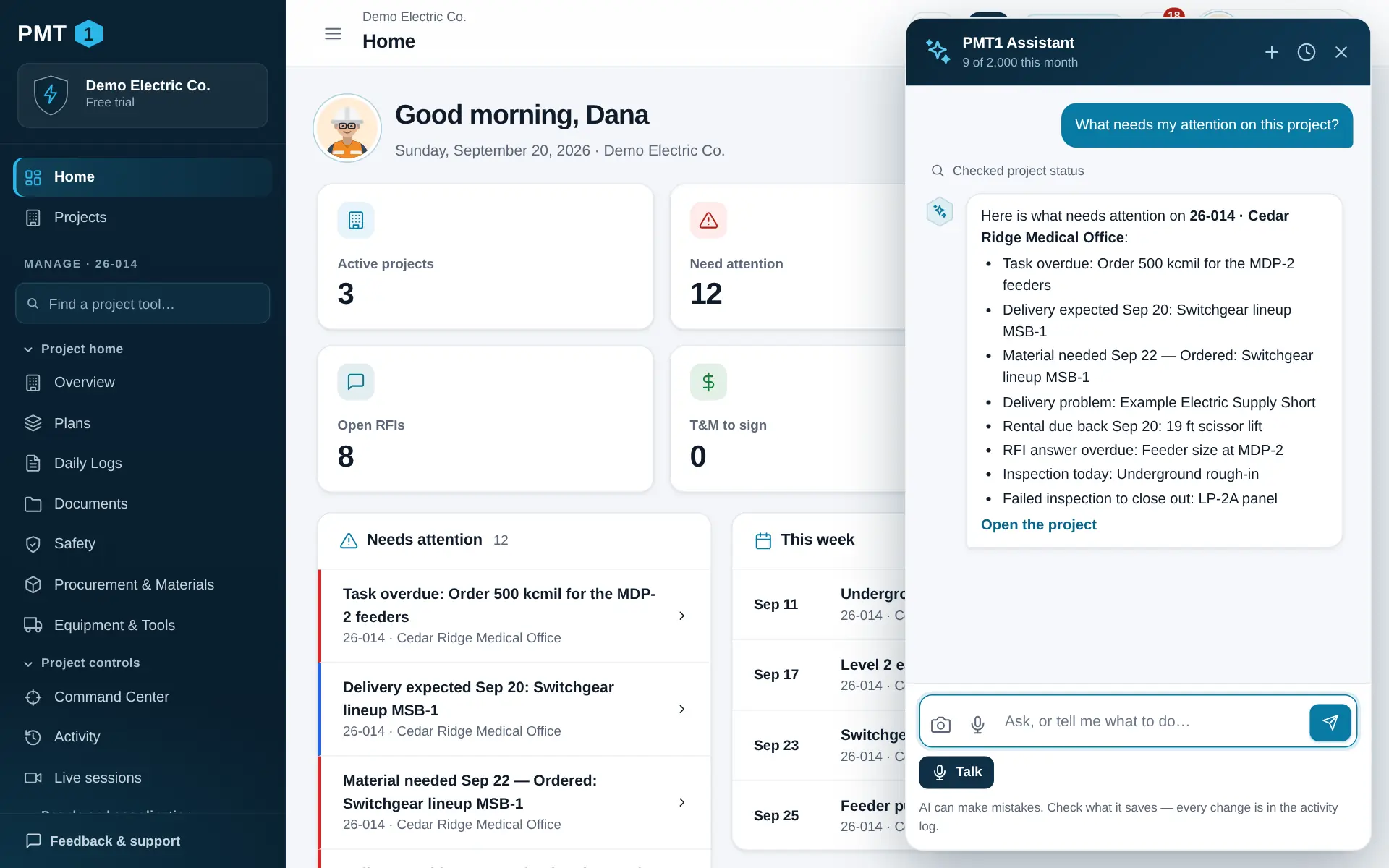
“What needs my attention on Cedar Ridge?” “Which RFIs are overdue?” “When is the scissor lift due back?” It looks at your actual records, not a guess.
“Add an RFI about the feeder size at MDP-2.” “Mark the underground inspection passed.” It fills in the form the same way you would.
Attach a picture of a packing slip, a receipt or a field condition and ask it to log what it sees — then attach the photo to the record.
“Which sheet shows panel LP-2A?” It searches the words on your current sheets, and names the sheet the answer came from.
Talk through the day — or film it — and it drafts the log: crews, work, deliveries, delays. Nothing is saved until you have checked it.
“Where does the budget stand?” “What is late in procurement?” “Make the handover report.” — for the people whose role lets them see it.
Dictate a message, or switch to hands-free and have a back-and-forth conversation with spoken replies. A mute button is always one tap away.
Ask for a page or a record and it opens it for you.
Guardrails
An assistant that can change your records has to be one you can trust and check.
The assistant runs as you. It cannot see a project you are not on or do anything your role does not allow.
Out of the box, deleting or archiving waits for your OK. Your company can make it ask before every change, or switch the assistant off entirely.
Each change the assistant makes is written to the activity log and marked as made by the assistant.
Your plan’s monthly allowance and what you have used are shown right in the assistant.
What you send the assistant is processed by our AI provider under terms that prohibit training on it.
Yes. It is good, not perfect. It can mishear a name, misread a blurry photo or pick the wrong record. Read what it saves — especially quantities, hours, dollar amounts and anything safety-related — before you rely on it or send it to anyone.
No. It never signs a record, and PMT1 does not send your records to anyone outside your workspace.
The assistant uses models from OpenAI through their business API. Under those terms your content is not used to train their models. They may keep it for up to 30 days to monitor for abuse, then delete it. See our subprocessors and AI terms.
Dictation and hands-free voice use your device’s microphone only while you have them switched on, and there is always a mute button. If other people may be recorded, you are responsible for telling them and getting any consent the law in your state requires.
Yes. Owners and admins can switch the assistant off for the whole company in Settings, or make it ask before every change. Read-only viewers and outside collaborators never have it.
Set up your company in a few minutes. Bring your team in when you are ready.